 Ilayantech
Clinic Management Software in India (2027): 10 Features Every Clinic Should Look For
Good clinic software takes repeat work off the front desk: booking, records, billing and the waiting list in one place. If you have more than one branch, shared patient records and combined reports matter most. And because it holds patient information, access control is not optional.
A clinic runs on small moments. Booking a slot. Finding what the doctor said last time. Calling the next patient. Writing the bill. When each one lives in a different place, the front desk becomes the busiest, most stressful corner of the building.
The right clinic management software puts those moments in one place. If you run a clinic in India, there are a few extra things to look for, like GST-ready billing and a queue that copes with walk-ins. Here are ten features worth looking for, whether you run one clinic or several, as you plan for 2027.
What clinic management software actually does
At its simplest, it replaces the paper register, the appointment diary and the billing file with one system. Done well, it also links them: a booking becomes a visit, the visit becomes a record, the record leads to a bill, and the bill can trigger a follow-up reminder.
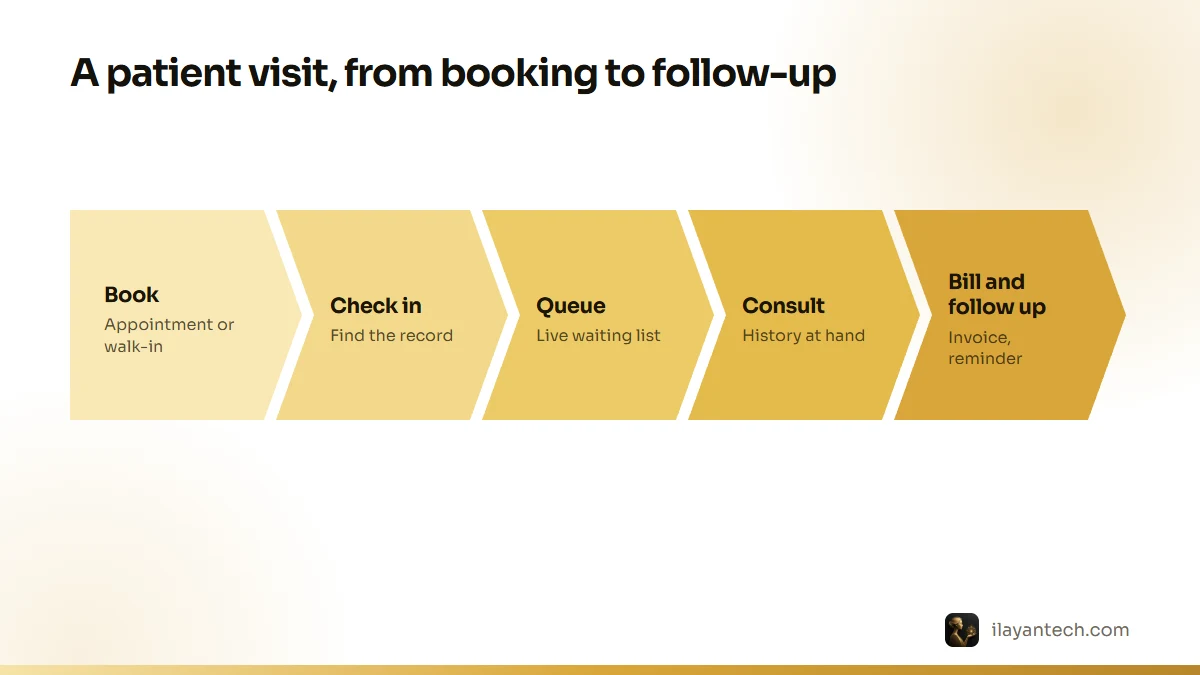
That chain is the whole point. The more steps the software connects, the less your team has to retype, and the fewer things get lost.
1. Appointments that don't double-book
You want each doctor's hours and breaks built in, a clear picture of the day, and rescheduling that takes seconds, not a round of phone calls. Walk-ins should be easy to add too, because most clinics see both.
2. Patient records you can actually find
Search by name or number, see previous visits and prescriptions, and be in the right file in seconds. If you have several branches, one shared record means patients aren't asked the same questions at every location.
3. A queue the front desk can run
A live waiting list, showing who's next and who's with the doctor, visible from any device. It sounds small, but it does a lot to calm a crowded waiting room. We wrote a whole guide on this: OPD queue management software.
4. Billing that matches how you charge
Quick invoices for consultations and services, split payments, discounts, returns, and a clean end-of-day close. In India, check for GST-ready invoices, and ask your accountant how GST applies to your services. For the software side, see our guide to GST billing software for multiple branches.
5. Medicines and stock under control
If you dispense or sell products, you'll want stock levels, batches, expiry dates and reorder alerts. We go into this more in our guide to multi-branch inventory and billing software and, for pharmacies, expiry tracking.
6. The right people see the right things
A receptionist, a doctor and a manager shouldn't all see the same screens. Roles and permissions matter, and so does an audit log of who looked at or changed what. Patient information deserves that care.
7. Reminders that reduce no-shows
A gentle appointment reminder or follow-up message, for instance on WhatsApp, keeps people turning up and keeps them informed.
8. Reports that answer real questions
Revenue, consultations, top-selling items, outstanding payments, staff activity: by branch and for the whole business. If you need a spreadsheet to understand your own clinic, the reports aren't doing their job.
9. Support for more than one branch
If you have, or plan to have, multiple locations, check for separate billing and stock per branch, shared patient records, and a combined view for the owner.
10. Easy to learn, easy to leave
New staff should be useful quickly. And you should be able to export your data at any time, so you're never trapped. It's a good sign when a vendor is relaxed about that.
Paper registers vs clinic management software
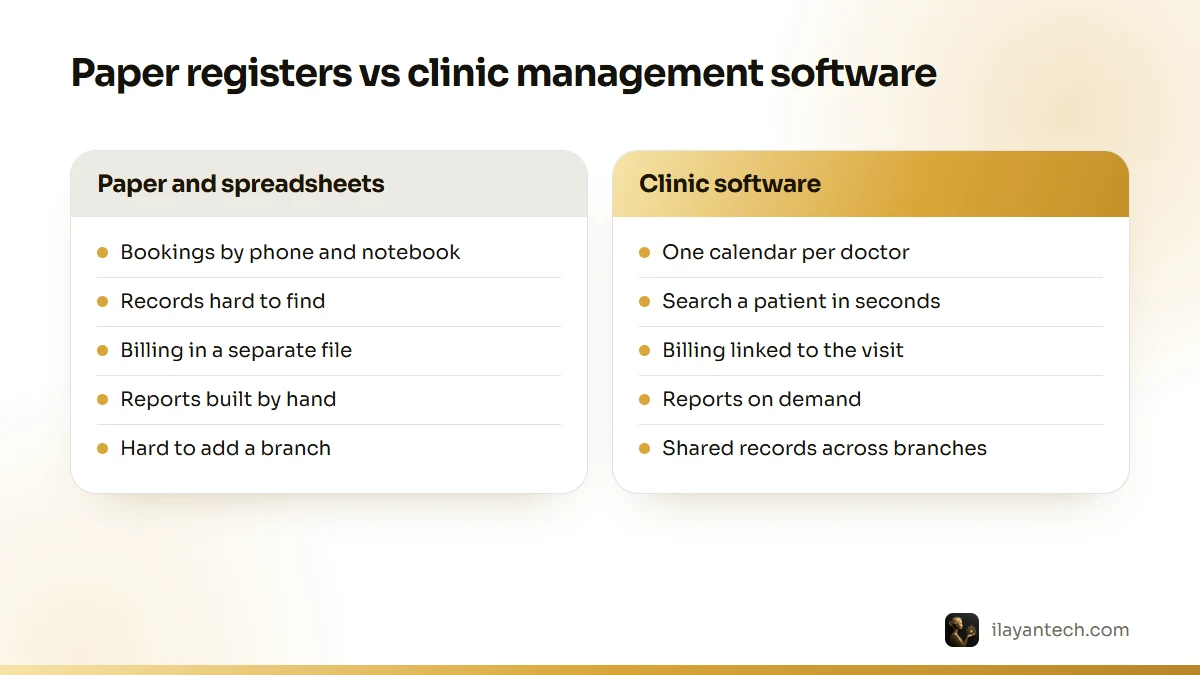
Paper works when you're small. The cracks show up when you add a second doctor, a second room or a second branch, and the register stops being something anyone can search or combine.
A few words on patient privacy
Patient records are sensitive, so treat software choice as a privacy decision too. This is general guidance, not legal advice, so check the rules that apply to you. Practical things to look for:
- Individual logins for every staff member, never shared passwords
- Roles that limit what each person can see
- An audit log of who viewed or changed records
- Regular backups and secure connections
- A clear answer on what happens to your data if you leave
Cloud-based or installed on your computer?
Older clinic software lives on one computer in the clinic. Newer products run in the cloud and open in a browser. Each has trade-offs.
- Cloud-based is easier to use from several rooms or branches, updates itself, and doesn't depend on a single machine. It needs a reasonable internet connection.
- Installed software works without internet, but a single computer failing can be a big problem, and sharing data between branches is harder.
For clinics with more than one room or location, cloud-based is usually the practical choice. Whichever you pick, ask how backups work, because that's what protects you on a bad day.
How to compare clinic management software vendors
| Question | What you want to hear |
|---|---|
| How long to get started? | Days, with help setting up |
| What support do I get? | A real person, in your working hours |
| What happens to my data if I leave? | You can export it all |
| How does the price change as I grow? | A clear, predictable answer |
| Can I try it first? | Yes, with a free trial or demo |
Ask for a trial with your own real scenarios: a booked patient, a walk-in, a bill with a discount, an urgent case. How the software handles your day matters more than a feature list.
Mistakes clinics make when choosing software
- Choosing by feature count. A long list means little if the daily steps are clumsy.
- Not involving the front desk. They'll use it most, so their opinion should count.
- Importing every old record on day one. Start with current patients and add the rest later.
- Ignoring data export. Make sure you can leave with your records if you ever need to.
A rollout plan for a clinic
- Set up the basics: doctors, working hours, services and prices.
- Bring across your patient list, starting with current patients rather than every old record.
- Train the front desk first. They'll use it most, and they'll spot problems fastest.
- Run it alongside the paper register for a few days, then switch.
- Add reminders, reports and stock once the daily flow feels natural.
A short list for your next demo
- Can we book, bill and manage the queue without switching tools?
- Could our receptionist learn it in a day?
- Is access limited by role, with a record of activity?
- Can we take our data with us whenever we like?
- What happens to the price when we add a doctor or a branch?
How ProjectRD helps clinics
ProjectRD covers appointments and provider schedules, patient history shared across branches, a live OPD queue, GST-ready billing, per-branch inventory and reports, all in one dashboard, with staff roles and an audit log. It's built so that a new hire can start in minutes.
A word on AI
You'll hear a lot about AI in healthcare software. Some uses are genuinely handy, others deserve caution, and we've written down our honest view in AI in business software: practical use cases. And if your clinic works in a way nothing off the shelf quite fits, talk to us. We build custom software too.
Frequently asked questions
Does a small clinic really need clinic management software?
If you spend time on paper registers, phone bookings or a separate billing file, probably yes. Even a one-doctor clinic gains a lot from tidy appointments, records and billing, and the time saved at the desk adds up quickly.
Is cloud-based clinic software safe?
It can be, when the provider uses proper access controls, backups and secure connections, and you manage your own user accounts carefully. Ask how data is stored, who can see it, and what happens to it if you stop using the service. This is general guidance, not legal advice, so check the rules that apply to you.
Can it handle more than one branch?
Good software can. Look for patient records shared across branches, billing and stock kept separate for each location, and reports that cover all sites.
How long does it take to get started?
For a small clinic, often just days. Most of the work is setting up doctors, services and prices, and bringing patient lists across. Starting with one branch or one department makes it easier.
What about GST billing for clinics?
Look for software that produces proper invoices and handles returns and split payments. Whether GST applies, and to which services, depends on what you provide, so confirm with your accountant. Our guide to GST billing software for multiple branches explains what to look for on the software side.