 Ilayantech
Pharmacy Inventory Software with Expiry Tracking: What Indian Pharmacies Should Look For (2027)
In a pharmacy, expiry is a slow leak. Software that tracks stock by batch, warns you early, and helps you sell the oldest stock first, or move it to a busier branch, protects both your margin and your customers. Look for batch-level stock, near-expiry alerts and clean billing.
Ask any pharmacy owner what keeps them up at night and expiry dates will be near the top. A box that quietly passes its date at the back of a shelf is money you've already spent and can't get back. That's why pharmacy inventory software with expiry tracking is one of the most valuable tools a medical store can have.
If you run a pharmacy in India, here is what to look for as you plan for 2027, in plain language and without the jargon.
Why expiry is a pharmacy's quiet money drain
Most losses from expiry aren't dramatic. A few strips here, a carton there, discovered during a stock check. Individually small, but they add up across hundreds of products and several branches, and they hit hardest on slow-moving medicines you bought in bulk for a discount.
There's also a bigger reason to care: selling an expired medicine is a risk to your customers and to your reputation. Good software makes that mistake much harder to make, by showing the expiry date at the moment of billing.
What pharmacy inventory software needs for expiry tracking
Many basic tools track stock only as a quantity: "50 strips of this medicine." That isn't enough. For expiry tracking, the software has to understand batches.
- Batch-level stock. The same medicine can sit on your shelf from three different batches, each with its own expiry date and purchase price.
- Expiry dates captured at purchase. Entered once when stock arrives, and carried through to billing and reports.
- Near-expiry alerts. A report or notification showing what's expiring soon, with a window you can set.
- Warnings at the counter. The cashier should see the batch and expiry date, and ideally be nudged towards the earliest batch.
FEFO: sell the batch that expires first
FEFO stands for first expiry, first out. It's a simple idea: sell the batch that will expire soonest, not just the one that arrived first. The difference matters because a newer delivery can sometimes carry an earlier expiry date than an older one.
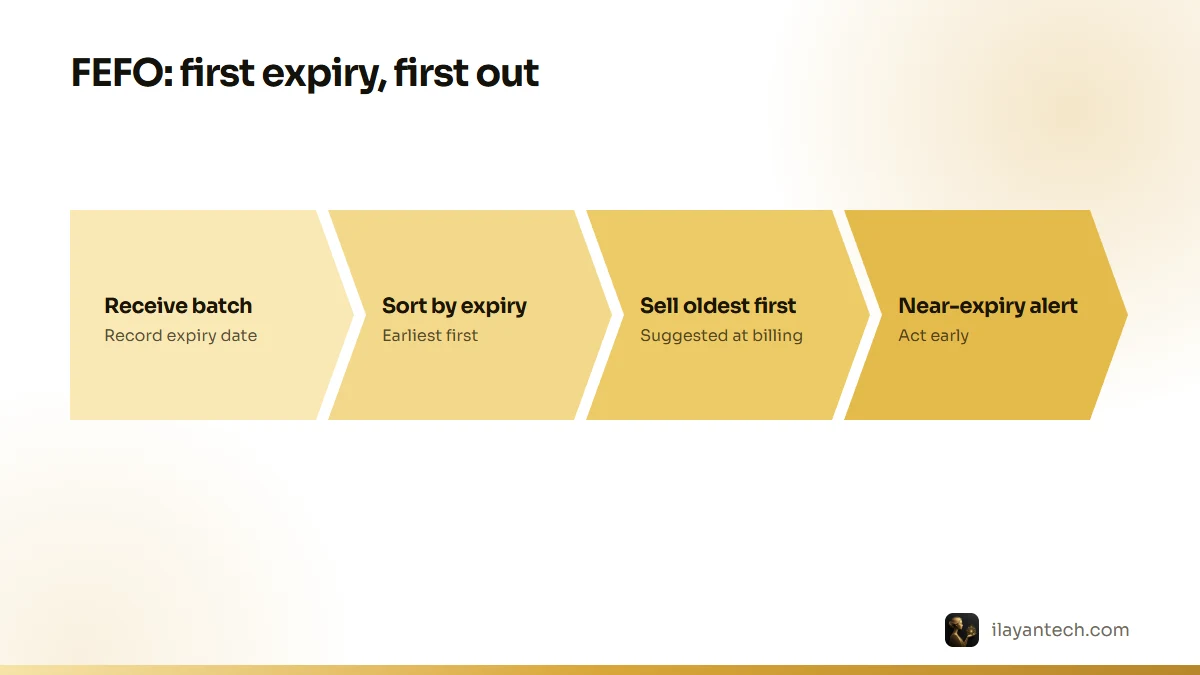
Good software does the sorting for you. When the cashier bills a medicine, the batch with the earliest expiry comes up first. Over time, that single habit reduces waste more than almost any other change.
What to do with near-expiry stock
Whatever pharmacy inventory software you choose, alerts are only useful if you act on them. A common routine looks like this:
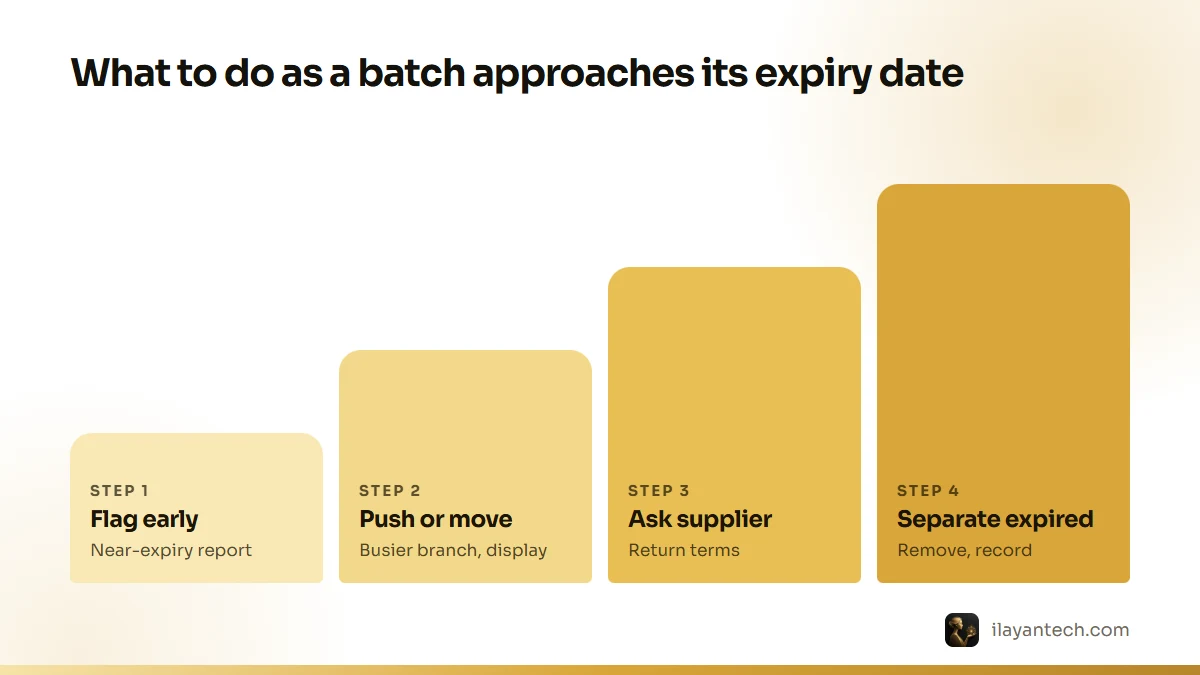
- Flag early. Review the near-expiry report regularly, not just at the stock check.
- Push or move it. Place it where staff and customers see it, mention it at the counter, or transfer it to a busier branch where it will sell faster.
- Talk to your supplier. Some suppliers accept returns or exchanges within certain windows. Know your terms before the stock gets close.
- Separate and record expired stock. Take it off the shelf and record it properly so your numbers stay honest.
The "move it to a busier branch" step is where multi-branch software really helps. If you run more than one store, read our guide to multi-branch inventory and billing software.
Reorder levels and dead stock
Expiry problems often start with ordering. Order too much of a slow mover and it ages on the shelf. Order too little of a fast mover and customers walk out.
Look for software that lets you set reorder levels per item and per branch, and that reports on both fast movers and dead stock, meaning items that haven't sold for a long time. Those two reports alone change how you buy.
Stock transfers between branches
If you have several stores, stock won't always be in the right place. One branch is overstocked on something another can't keep on the shelf. Transfers fix that, but only if they're recorded properly: what left, what arrived, and when, with both branches' numbers updated. Otherwise stock disappears between two locations and nobody's sure where.
Billing, returns and GST
Pharmacy billing needs to be fast, because there's often a queue. Look for quick search by name or salt, barcode scanning if you use it, and the ability to handle returns and split payments without fuss.
In India you'll also want GST-ready invoices. How GST applies to your products and your branches is a question for your accountant, but the software should produce clean invoices and reports they can work from. We cover this in our guide to GST billing software for multiple branches.
Records for regulated medicines
Some medicines and sales carry extra record-keeping requirements. This is general guidance, not legal advice, so check what applies to you. What you can look for in software is the ability to store and retrieve the details you're required to keep, rather than relying on a separate register.
Slow-moving and seasonal stock
Some medicines sell steadily all year. Others spike with the season, such as cold and flu remedies, or sit unsold for months. Those are the ones that most often end up near expiry.
Software that shows sales trends by item and by month helps you buy for the season rather than for the worst-case scenario. Combined with reorder levels per branch, it lets you order smaller quantities more often, which is easier on cash flow and on your shelves.
Reports a pharmacy actually needs
- Near-expiry stock, by branch and by date window
- Fast movers and dead stock
- Low stock, against reorder levels
- Sales and margin by item, category and branch
- Purchases and supplier history
- Staff activity, with an audit log
Pharmacy inventory software checklist
| Feature | Why it matters |
|---|---|
| Batch and expiry tracking | Stops expired sales, supports FEFO |
| Near-expiry alerts you can configure | Gives time to act |
| Reorder levels per branch | Prevents overstock and stock-outs |
| Stock transfers with a record at both ends | Moves near-expiry stock safely |
| Fast billing, returns, split payments | Keeps the queue moving |
| GST-ready invoices | Clean records for your accountant |
| Roles, permissions and audit log | Accountability at the counter |
| Export to Excel or CSV | You always own your data |
Mistakes to avoid
- Tracking quantity only. Without batches, expiry tracking isn't real.
- Entering expiry dates later. If they aren't captured at purchase, they won't be there when you need them.
- Ignoring the alerts. A report nobody reads saves nothing. Make it a weekly habit.
- Starting with messy item names. Clean your list first, so one medicine isn't five different entries.
- Choosing on price alone. Cheap software without batch handling costs more in expired stock.
How to start without disrupting the counter
- Clean your item list. Merge duplicates, standardise names and units.
- Enter current stock by batch with expiry dates, starting with your fastest and most expensive items.
- Train the counter staff on one habit: check the batch and expiry at billing.
- Run it alongside your old system for a few days.
- Add reports and alerts once billing feels natural.
Moving from spreadsheets? It helps to know the signs you've outgrown them, so you can be sure the switch is worth it.
Where ProjectRD fits in
ProjectRD is our platform for growing pharmacies, clinics and shops. It tracks inventory by batch and expiry with reorder levels per branch, supports stock transfers with a record at both ends, produces GST-ready invoices, and keeps staff roles and an audit log. Every module is on every plan, and plans are flat rather than per-seat.
If you'd like to see how it would handle your store, or you need something built around a very specific way of working, get in touch.
Frequently asked questions
What is FEFO and why does it matter for a pharmacy?
FEFO means first expiry, first out. You sell the batch that expires soonest before newer ones. It is different from simply selling the oldest delivery, because a newer delivery can sometimes have an earlier expiry date. Good pharmacy software helps staff follow it.
How early should near-expiry alerts appear?
It depends on the product and how fast it sells. Many pharmacies like alerts a few months ahead for slow-moving items, so there is time to push the stock, move it to another branch, or talk to the supplier. Good software lets you set this yourself.
Can pharmacy software work across several branches?
Yes. The useful version tracks batches separately at each branch and lets you move stock between branches with a record at both ends, so near-expiry stock can be sent to a branch that will sell it faster.
Does pharmacy software handle GST billing?
Look for GST-ready invoices with returns and split payments. How GST applies to your products is a matter for your accountant, so confirm the details with them.
Are there extra record-keeping rules for medicines?
Some medicines and sales need additional records under regulations. Check what applies to you and make sure the software lets you store and retrieve the details you are required to keep. This is general guidance, not legal advice.