 Ilayantech
OPD Queue Management Software: How to Calm a Crowded Waiting Room (2027 Guide)
A good OPD queue shows the whole clinic, in real time, who is waiting, who is next and who is with the doctor. It handles walk-ins and appointments together, tells patients when to come in, and links to billing and records. Start with one doctor and one week, then widen.
Walk into almost any busy clinic and you can feel the waiting room before you see it. People hovering at the desk, asking how long. A receptionist juggling phone calls and the register. A doctor wondering who's next. OPD queue management software exists to take that tension out of the room.
This guide explains what it does, what to look for, and how to introduce it without disrupting your day, as you plan for 2027.
Why clinic waiting rooms get chaotic
It's rarely anyone's fault. Several things pile up at once:
- Walk-ins arrive without warning, while booked patients expect to be seen on time.
- Patients arrive for different doctors, and the order isn't obvious.
- The front desk is also answering calls, taking payments and finding records.
- Nobody except the receptionist knows the real order, so everyone keeps asking.
A paper token and a notebook can handle this for a while, but they stop working as soon as you have more patients, more doctors, or more than one branch.
What OPD queue management software does
At its core, it keeps one live list of who's waiting, who's next and who's with each doctor, and shows it to everyone who needs it: the front desk, the doctors, and sometimes the patients.
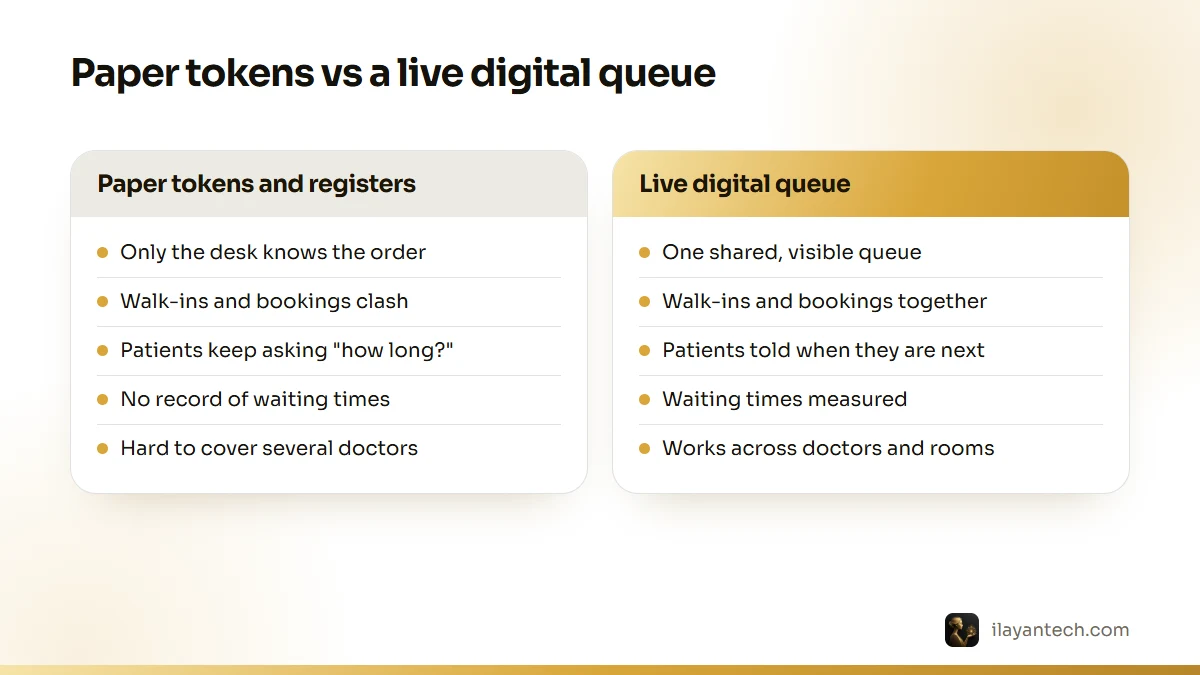
The main benefit isn't speed on its own. It's that everyone sees the same truth, so there's much less asking, guessing and arguing.
Features to look for
A queue everyone can see
A live list on the front desk's screen, visible from any device, showing who's waiting, how long they've waited, and who's next for each doctor.
Walk-ins and appointments together
Most clinics see both. The software should put them in one queue, with rules you control, so booked patients aren't pushed back by walk-ins, and walk-ins aren't forgotten.
Support for several doctors and rooms
Each doctor should have their own queue, and the desk should be able to see them all at once. Patients should be easy to move from one doctor to another when needed.
A doctor's view
The doctor should be able to call the next patient with one click, see their record straight away, and mark the visit done so the queue moves on.
Messages that tell patients when to come in
A simple message, for example on WhatsApp, saying "you're next" lets people wait in the car or step out, which clears the room and keeps people calmer. It's a helpful extra rather than a requirement.
Priority handling
Emergencies, the elderly and other urgent cases sometimes need to be seen sooner. A good system lets the front desk move someone up deliberately, with a record of what happened.
Waiting-time data
How long do patients typically wait? Which doctor's session runs late? Which hour is busiest? These numbers help you schedule better. Without software, nobody really knows.
A link to billing and records
The queue shouldn't be a separate island. When a patient is called, their record should be right there, and when they finish, the bill should flow from the visit. We explain how these pieces fit in our guide to clinic management software features.
What the front desk will worry about
New software often meets quiet resistance, and it's worth understanding why. The front desk fears more work, being blamed for delays, and learning something complicated while patients wait.
The answer is to involve them early, keep the daily steps very simple (arrive, join queue, call next, done), and make it clear the software is there to take the pressure off them, not to monitor them.
Rolling it out without drama
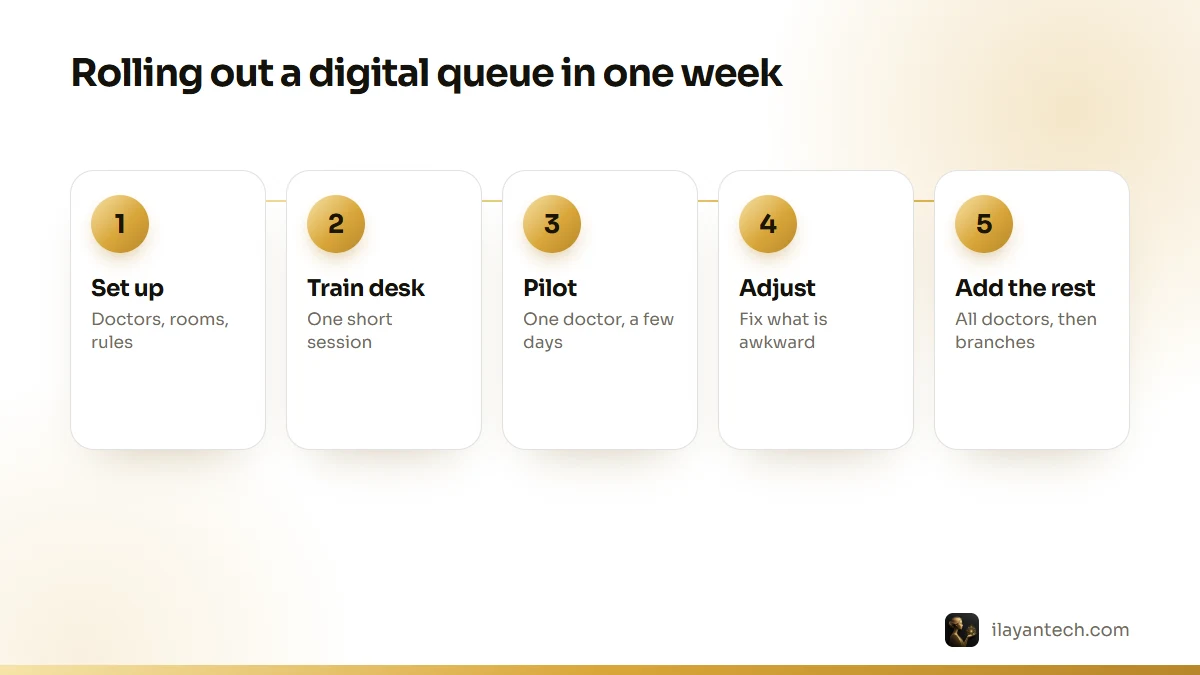
- Set up the basics. Doctors, rooms and working hours, plus your rules for walk-ins and urgent cases.
- Train the front desk first. One short session, and a person they can ask.
- Pilot with one doctor. Run it for a few days, with the paper system as a backup.
- Adjust. Fix what's awkward, because small irritations decide whether people keep using it.
- Add the rest. More doctors, then more branches.
Queue rules clinics commonly use
Every clinic runs a little differently, so look for software that lets you set rules instead of forcing one way:
- Booked patients are seen close to their slot, and walk-ins fill the gaps.
- Follow-up visits can be fast-tracked when the doctor wants.
- Elderly patients, children or urgent cases can be moved up by the front desk, with a note.
- Patients who step out can be placed back in the queue without starting again.
Handling peak hours
Most clinics have a rush: first thing in the morning, or after work. A digital queue makes the rush visible. You can see how many people are waiting for each doctor, how long it's taking, and where to send help. Some clinics use that information to add staff at busy times, or to encourage booked slots at quieter ones.
How to tell it's working
Pick a few simple measures before you start, and look again after a month:
- Average waiting time per doctor
- How often patients ask "how long?" at the desk (you'll feel this one)
- Number of walk-ins handled per session
- Patients who left without being seen
If those numbers improve, and the front desk is less stressed, you've got your answer.
A note on waiting-room screens and privacy
If you show the queue on a screen in the waiting room, use token numbers or first names only, so patient details aren't visible to everyone. Keep full records on the desk and doctor screens, behind each person's own login.
What if the internet goes down?
It will, occasionally. Ask any vendor what happens then, and keep a simple fallback: a printed list for the day, and a plan for entering visits afterwards. A good system also recovers cleanly when the connection comes back, without losing anyone's place.
Common mistakes
- Doing it all at once. Start with one doctor.
- Making check-in too complicated. If joining the queue takes more than a few seconds, people will skip it.
- Forgetting walk-ins. A system that only handles appointments won't survive a real clinic.
- Ignoring the data. Waiting-time reports are one of the best reasons to have software. Look at them.
- Treating it as separate from billing and records. The real saving comes when everything connects.
Questions to ask in a demo
- Can the front desk see every doctor's queue at once?
- How do walk-ins and appointments share one queue?
- What does a doctor click to call the next patient?
- How do we mark an urgent case, and is it recorded?
- Can we see waiting times by doctor and by hour?
- Does the queue connect to patient records and billing?
If you run more than one clinic
For several branches, you'll want each branch's queue handled separately, with the owner able to see them all, and patient records shared across locations. That combination, plus billing and stock per branch, is what multi-branch software is for.
Where ProjectRD fits in
ProjectRD includes a live OPD queue the front desk can actually run, with the waiting list visible from any device. It sits alongside appointments and provider schedules, patient history shared across branches, GST-ready billing, per-branch inventory and reports, so nothing has to be retyped. New staff can learn it in minutes.
Want to see how it would work in your clinic, or need something designed around the way you work? Talk to us.
Frequently asked questions
What is OPD queue management software?
It is software that organises the outpatient waiting list in a clinic or hospital. It records who has arrived, the order they will be seen, and who is currently with each doctor, so the front desk and the doctors work from the same live list.
Can it handle both appointments and walk-ins?
Good software can. Booked patients and walk-ins join the same queue, with rules you set, such as seeing booked patients at their time and fitting walk-ins around them.
Do patients need a smartphone?
Not necessarily. The front desk can manage the queue entirely. Messages to patients, for example on WhatsApp, are a helpful extra for those who want to wait elsewhere, not a requirement.
How long does it take to set up?
For a small clinic, often a day or two to set up and about a week to settle in. Starting with one doctor and one session makes it easier.
Can urgent cases skip the queue?
They should be able to. Look for a way to mark a patient as urgent, so the front desk can move them up deliberately, with a record of why.