 Ilayantech
Multi-Branch Inventory Software and GST Billing in India (2027): What to Look For
You want one place to see every branch, with stock and billing still kept separate for each. Batch and expiry tracking, stock transfers with a record at both ends, and a proper day-close save the most time. Pick something a new hire can learn in minutes, with pricing that does not punish you for growing.
One shop is manageable. You can see the shelves, you know the staff, and the numbers sit in your head. Then you open a second one, and a third, and suddenly you're running on phone calls. "Do you have this in stock?" "Can you send ten boxes over?" "What did we sell on Tuesday?"
That's the point where multi-branch inventory software stops being a nice extra. If you run shops, clinics or pharmacies in India, you also need billing that fits GST. Here's what to look for, whoever's product you end up choosing, as you plan for 2027.
Why multi-branch inventory software is different
Software built for a single counter tends to creak when you add a second. You now need to know what each branch holds, who sold what and where, when stock should move, and how the whole business is doing, without ever mixing the branches up.
Spreadsheets can cope for a while, which is why so many businesses stay on them too long. If that's you, our piece on the signs you've outgrown spreadsheets will feel familiar.
Signs you're ready for multi-branch software
- You regularly ask branches by phone what they have in stock.
- Stock moves between branches with only a note or a message to prove it.
- Month-end means combining files from every location.
- You've sold items past their expiry, or only found out when it was too late.
- You can't easily tell which branch or which person is performing best.
The features that matter
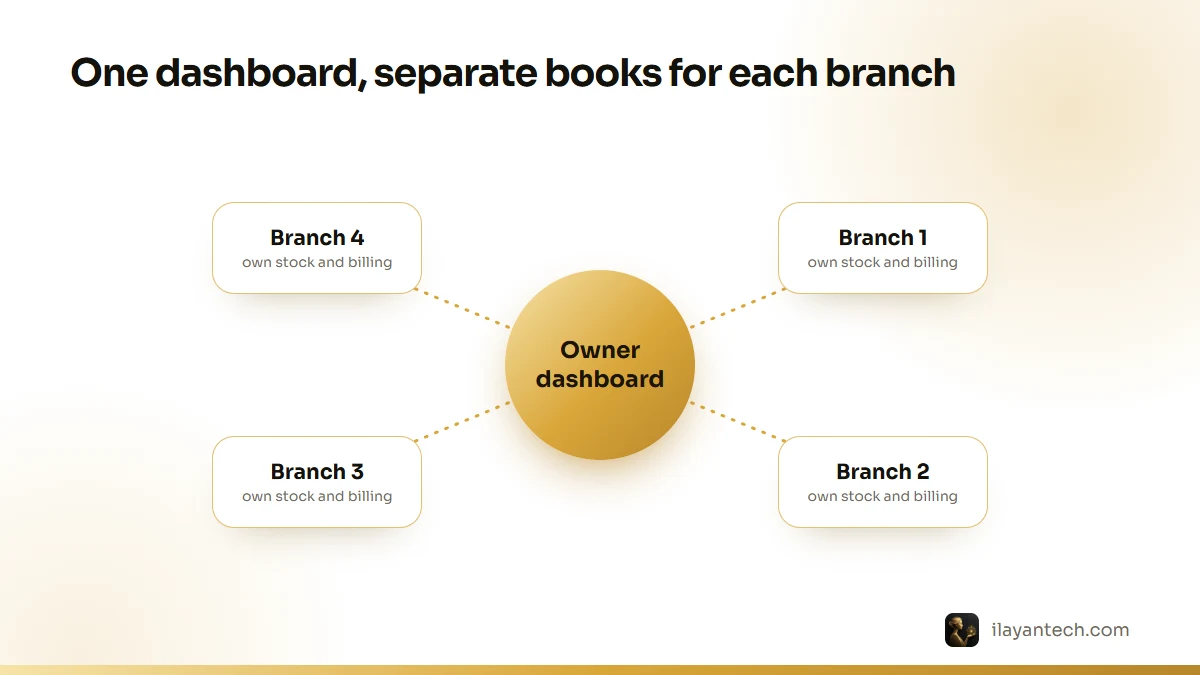
One view across everything. As an owner, you should be able to open one screen, see all branches, and filter down to one. If you have to log in and out to compare locations, it's not really multi-branch.
Stock tracked per branch. Each location needs its own levels, reorder points and low-stock warnings. The aim is to find out you're running low before a customer does.
Batches and expiry. If you sell medicines, cosmetics, supplements or food, this is essential. The software should tell you which batch is closest to expiry so it gets sold first, rather than discovering it at the back of a shelf. We go deeper in our guide to pharmacy inventory software with expiry tracking.
Transfers with a paper trail. When stock moves between branches, there should be a record at both ends: what left, what arrived, and when. Otherwise things vanish somewhere between two vans and two stock sheets, and nobody knows whose fault it was.
Billing that fits local rules. In India, that means GST-ready invoices. Beyond that, look for split payments, returns, and a proper day-close, so the till and the system agree at the end of every shift. Our guide to GST billing software for multiple branches covers this in detail.
Different access for different people. A cashier shouldn't see what an owner sees. Look for roles and permissions, ideally per branch, and an audit log that shows who changed what.
Reports without the weekend. Sales, stock and staff numbers across every branch, without you exporting five files and stitching them together on a Sunday.
Something people can learn quickly. If a new cashier needs a training session, the software is working against you. A good test: could someone be useful with it in their first hour?
Everyday extras. WhatsApp messaging, click-to-call, printable templates and export to Excel or CSV sound minor and end up saving real time.
Fair pricing. Check whether you pay per user, per branch or per feature. Per-seat pricing can quietly punish you for hiring. Flat plans are far easier to plan around.
How a good stock transfer should work
Transfers are where most multi-branch businesses lose track of things, so it's worth knowing what "good" looks like.
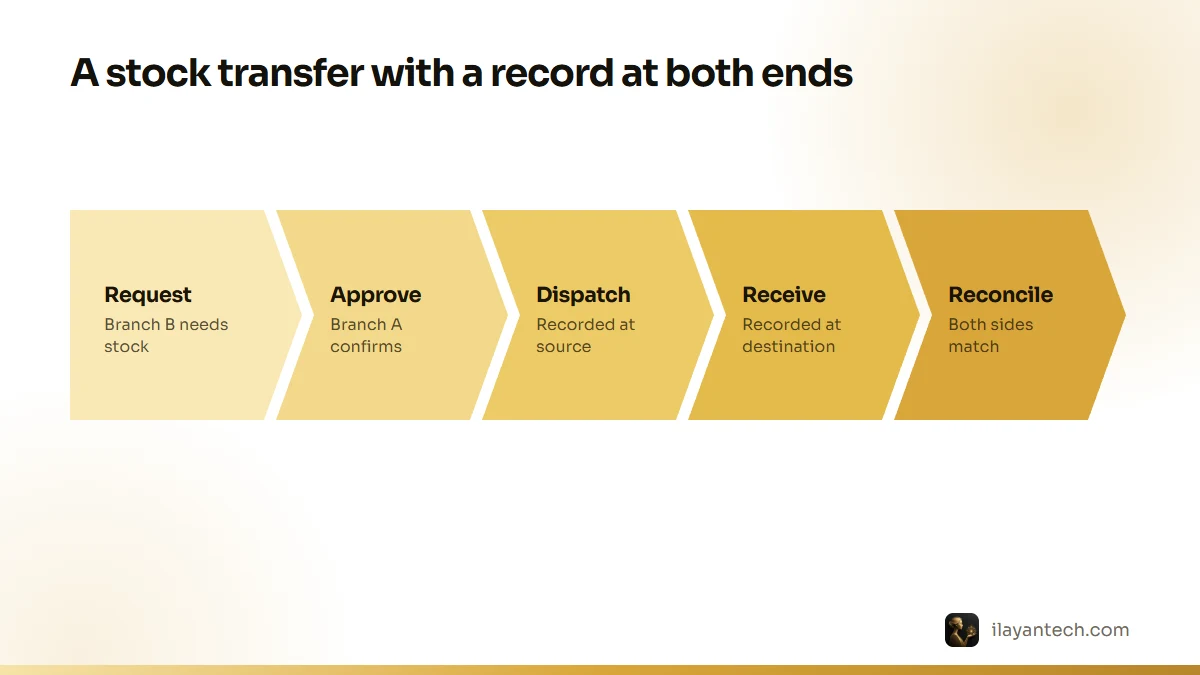
One branch asks, another approves, stock leaves and is recorded at the source, arrives and is recorded at the destination, and the two sides are checked against each other. If the numbers don't match, you know straight away, and you know where to look. Compare that with a phone call and a scribbled note, and it's obvious why this feature saves so much trouble.
Central control or branch freedom?
Every multi-branch business has to decide how much each location can do on its own. Some owners want prices, discounts and item lists controlled from the centre. Others let branch managers decide a lot. Good software supports both through permissions.
A sensible starting point: keep the item list and tax settings central, let each branch manage its own daily billing and stock counts, and keep discounts, returns and price changes limited to managers. You can loosen things later as trust builds.
How pricing models compare
| Model | How it works | Watch for |
|---|---|---|
| Per user | You pay for every person who logs in | Costs climb with every hire |
| Per branch | You pay for every location | Fine if branches are few and busy |
| Flat plans | A set price for a set number of sites and staff | Check the limits, and what happens when you exceed them |
| Per feature | Core is cheap, extras cost more | The extras you need may be the expensive ones |
Whichever model you pick, work out the cost for the team and branches you expect to have in two years, not the ones you have today.
A quick checklist
| Ask this | A good answer |
|---|---|
| Can I see every branch in one view? | Yes, with filters by branch |
| Is stock tracked by batch and expiry? | Yes, separately per branch |
| Are transfers recorded at both ends? | Yes |
| Are invoices GST-ready, with returns and split payments? | Yes |
| Can I control who sees what? | By role and branch, with an audit log |
| Can I take my data with me? | Yes, CSV or Excel |
| What happens to the price if I add staff or a branch? | It's clear and predictable |
Free download: we turned this into a two-page multi-branch software checklist (PDF) that you can bring to any demo.
A sensible rollout plan
You don't need to switch everything in a weekend. A calm, staged approach works better.
- Week 1: prepare. Clean your item list. Merge duplicates, fix names, decide on units and categories.
- Week 2: pilot at one branch. Start with your most organised branch. Import items and opening stock.
- Week 3: learn and adjust. Fix what's awkward, train the team, and run alongside your old system for a few days.
- Week 4: add branches. Roll out to the others, one at a time, using what you learned.
Mistakes we see again and again
Choosing on price alone. A cheap tool that can't handle transfers or expiry will cost you far more in hours than it saves in rupees.
Importing messy data. If the same product exists under three names, any software will struggle.
Switching every branch at once. Start with one. Learn what's awkward. Then roll out.
Skipping the training. Even simple software needs a short walkthrough and a named person people can ask.
Not asking what growth looks like. Ask the vendor to show you, step by step, what adding a new branch involves.
Forgetting the owner's needs. Cashiers need speed. Owners need clear reports. Make sure the software serves both.
Where ProjectRD fits in
We built ProjectRD because we kept running into exactly this problem. It brings GST-ready billing, per-branch inventory with batches and expiry, stock transfers between sites, staff roles with an audit log, and reports across every branch into one dashboard. Every module is on every plan, and plans are flat rather than per-seat.
It's meant for growing clinics, pharmacies and shops, where the owner needs a new hire working in minutes and not after a training course. If your needs are unusual enough that no ready-made tool fits, we also build custom software, and our piece on custom software vs off-the-shelf software will help you decide which way to go. Or just get in touch.
Frequently asked questions
What is multi-branch inventory software?
It is software that tracks stock, sales and staff across several locations in one system. Each branch keeps its own stock and billing, while owners and managers can see everything together and move stock between branches.
Do I need separate software for billing and inventory?
You don't have to. When one system handles both, a sale reduces stock automatically, so nobody types things twice and the numbers agree. Separate tools can work, but they need to be connected properly.
What is batch and expiry tracking, and who needs it?
It records which batch an item came from and when that batch expires. Pharmacies, wellness and healthcare products, cosmetics and food all need it. It lets you sell older stock first and avoid selling anything past its date.
Can one system handle GST billing for several branches?
Good software can produce GST-ready invoices for each branch, with returns and split payments. How GST registration works for different branches depends on your situation and state, so confirm the details with your accountant. We go through the billing side in our guide to GST billing software for multiple branches.
How hard is it to switch?
Usually less hard than people fear. The slow part is almost always preparing the item and stock list, not learning the software. Start with one branch, learn from it, and then add the others.